[tool] Game Updates v3.0.7 (FW Version überprüfung + DLs)

  • *updated* PS3 Game Updates v3.0.7 verfügbar

    Changelog for v3.0.7:

    Added scan for updates of PS3 ISOs,
    added scan of GAMES + GAMEZ + PS3ISO folders if a path like x:\ is entered.


    *updated* PS3 Game Updates v3.0.3 verfügbar

    Download
    PS3 Game Updates-aktuellste Version


    Changelog 2.4:
    -The title id field accepts many formats of title id (eg: title id with/without dash, content id, URL of pkgs, etc). Also supports search game by name.
    -The title id field also accepts the path of GAMES or the IP of the PS3 (to scan multiple games).
    -Show game patches 3.56+ in a different color (pink).
    -Auto-detects game patches already downloaded (search in PS3_UPDATE, PS3_EXTRAS, and in the default download path) and show them in gray.
    -Asks for confirmation to download patches 3.56 or higher. Required firmware version is appended to the name of the file.
    -Show game cover and game description even if the game does not have updates.
    -Auto-fix downloaded PKGs that required firmware 3.60

    Changelog 2.0:
    - Verifies the installed version of the games (requires multiMAN or any other FTP server)
    - Items can be removed from the list (press Del)
    - List only packages ready to download (press Ctrl+Del)
    - Many other cosmetic changes


    PS3 Game Updates 1.0.4 2012-06-19!

    Download
    PS3 Game Updates 1.0.4

    Mit dem PS3 Game Updates v1.0 den uns "aldostools" bereitgestellt hat,
    könnt ihr Überprüfen welche Firmware ein Spieleupdate benötigt
    und könnt diese auch direkt Downloaden.

    Habs getestet und Funktioniert.
    Wichtig ist das ihr die msvbvm50.exe installiert habt

    es wird die FW Version angezeigt
    und ob das Update CFW kompatibel ist oder nicht
    wenn ihr ein Update downloaden wollt,
    könnt ihr das mit der rechten Maustaste machen,
    oder den DL Link der hinten steht kopieren
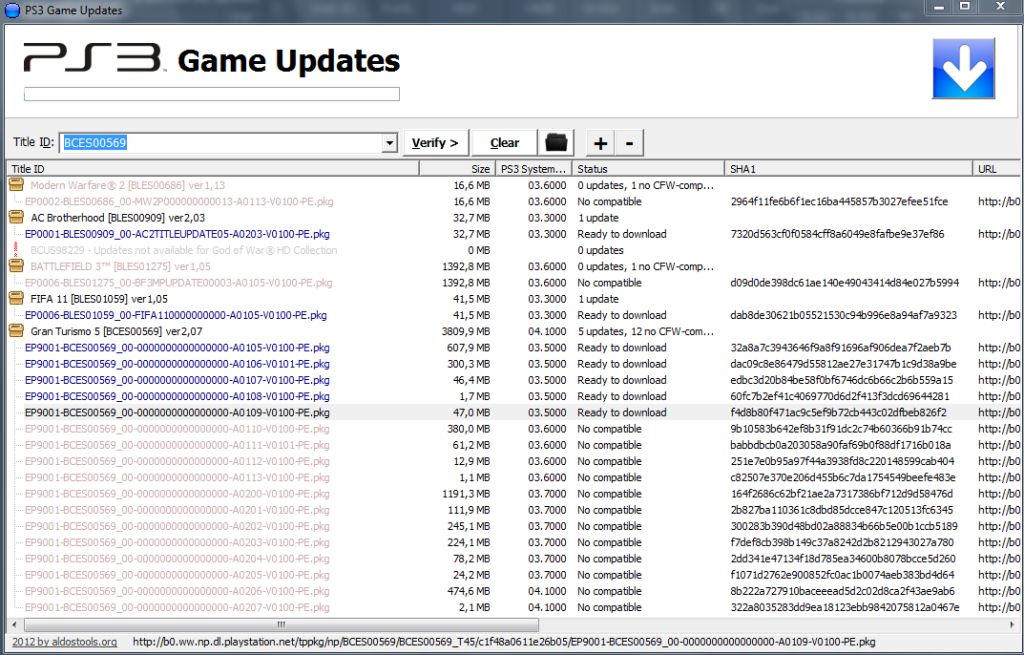
    Zitat:
    My new tool... (beta)

    I really liked the trueicecold's PS3 Game Updater 1.41, but I wanted a couple of new features... so I made my own "PS3 Game Updates 1.0"...

    Features:
    -The title id field accepts many formats of title id (eg: title id with/without dash, content id, URL of pkgs, etc). Also supports search game by name.
    -The title id field also accepts the path of GAMES or the IP of the PS3 (to scan multiple games).
    -Show game patches 3.56+ in a different color (pink).
    -Auto-detects game patches already downloaded (search in PS3_UPDATE, PS3_EXTRAS, and in the default download path) and show them in gray.
    -Asks for confirmation to download patches 3.56 or higher. Required firmware version is appended to the name of the file (for 3.56+).
    -Show game cover and game description even if the game does not have updates.


    Downloads:
    ps3gameupdates.rar
    ps3gameupdates_noinstaller.rar (no installer, just EXE)


    Required: MSVBVM50.DLL (not needed if you already use his other tools)

    Source: aldostools@PS3Hax

  • Mal ne blöde frage,
    macht das der mmc nicht auch wenn man das auf update drückt??
    Oder läuft diese version besser? Oder findet mehr updates?

    Paranoide Menschen sehen die Welt heutzutage irgendwie realistischer .... :winking_face:

  • wäre geil, wenn damit auch debug updates laden könnte!

  • das müsste man mal für die ps3 importieren ,wäre echt ne feine sache

    ups gibts ja schon

  • sieh das Tool mehr als schnelle Übersicht welche Updateversionen es gibt :winking_face:

    mmCM läd dir ja die kompatiblen Spieleupdates
    also brauchste nur die Info welche Version Aktuell ist um die PARAM.SFO abzuändern
    damit dich Online keine neueren Spieleupdates nerven :D


    Edit:
    ich habe mir mal einige Gameupdates angeschaut und mit unserer Kompatibilitätsliste verglichen.

    Dabei ist mir Aufgefallen das es sehr viele Spiele gibt bei der eine eboot ausgetauscht werden soll,
    für das es aber Spieleupdates gibt die nur eine Firmware bis 3.55 verlangen.

    Man sollte also bevor man die eboot austauscht erst schauen ob es nicht ein kompatibles Update für das Spiel gibt.

    Das Tool ist echt gut dafür :slightly_smiling_face:


    und da man ja eboots bis FW 3.56 auch selber Patchen kann, gehen alle Updates die eine FW bis
    3.56 verlangen mit etwas Arbeit auf allen 3.55 & 3.41 Firmwares
    Hier das Tool dazu, [Tutorial] [PCTool] EbootMod "eboot.bin" patch Tool

  • Hi.
    Bin neu hier und habe euer Forum auf der suche nach einer Anleitung gefunden um die CFW 4.3 zu installieren.
    Hat auch alles super geklappt, nur will ich jetzt die "Sicherheitskopien" der spiele Updaten.
    Ich habe schon alle Updates mit diesem Game Updates v2.4 gedownloaded.
    Meine Frage ist nun: Wie gehts weiter / Wie installier ich diese nun?
    ( Die Sicherheitskopien liegen auf einer externen )

    Oder muss ich die alle an der PS3 mit diesem MMCM downloaden?

    Hoffe ihr könnt mir helfen.


    Gruß Gummiy

  • Für cfw4.30 war das jetzt rausgeworfene Zeit...
    Einfach die Updates über MM installieren..
    Und wenn ein Spiel unter 4.30 nicht startet, die Original Eboot wiederherstellen oder nochmal neu einlesen, sofern es ein gepatchtes für 3.55/3.41 war

    KEIN Support per PN oder Pinnwand! Zum Fragen ist das Forum da, dass ist der Sinn einer Community
    Supportanfragen per PN/ Pinnwand werden grundsätzlich ignoriert

  • Mal ne blöde Frage(weil ich ja jetzt die Rogero 4.30 1.02 drauf hab und auch alles an Updates installieren kann ;-)): hab mal BCES00569(Gran Tourismo 5 getestet..also eingegeben). Da zeigt er mir 19 Updates an...Version 1 und Version 2!!!?? Was soll das heißen Version 1 und 2??

    Version 1 geht bis 1.13 ist bis FW 3.60
    Version 2.00 fängt bei 3.70 an und geht bis 2.09(FW 4.10). Damit hats aber doch nichts zu tun oder doch?

    Einmal editiert, zuletzt von spezl (6. November 2012 um 12:26)

  • Hatte ja bis 1.09(also FW 3.50) installiert. Soll ich die ganzen 1er updates deinstallieren(evtl um Platz auf der Platte zu sparen) oder kann ich die Version 2 Updates drüberinstallieren(weil die die anderen einschließen)?

    Falls es noch andere Spiele gibt mit Version 1 und 2 dann kann/brauch ich immer nur die 2er Updates laden!?

  • Muß es manuell machen. Die Lankabel sind entlang der Wand hinter der Laminatleiste verlegt und reichen nur bis zum PC/Notebook. Aber ich hab ja diese Woche Urlaub und etwas Zeit ;-).

    Auf jeden Fall danke für die Tipps/Hilfe.

Jetzt mitmachen!

Sie haben noch kein Benutzerkonto auf unserer Seite? Registrieren Sie sich kostenlos und nehmen Sie an unserer Community teil!